linkElementElementElement functions can be customized with set and show rules.
set and show rules.Links to a URL or a location in the document.
By default, links do not look any different from normal text. However, you can easily apply a style of your choice with a show rule.
Example
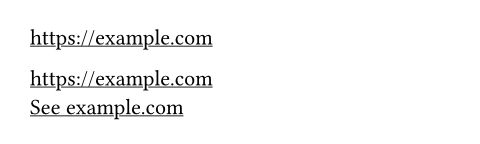
#show link: underline

https://example.com \

#link("https://example.com") \
#link("https://example.com")[
  See example.com
]
Syntax
This function also has dedicated syntax: Text that starts with http:// or
https:// is automatically turned into a link.
Hyphenation
If you enable hyphenation or justification, by default, it will not apply to
links to prevent unwanted hyphenation in URLs. You can opt out of this
default via show link: set text(hyphenate: true).
Accessibility
The destination of a link should be clear from the link text itself, or at least from the text immediately surrounding it. In PDF export, Typst will automatically generate a tooltip description for links based on their destination. For links to URLs, the URL itself will be used as the tooltip.
Links in HTML export
In HTML export, a link to a label or location will be turned into a fragment link to a named anchor point. To support this, targets without an existing ID will automatically receive an ID in the DOM. How this works varies by which kind of HTML node(s) the link target turned into:
-
If the link target turned into a single HTML element, that element will receive the ID. This is, for instance, typically the case when linking to a top-level heading (which turns into a single
<h2>element). -
If the link target turned into a single text node, the node will be wrapped in a
<span>, which will then receive the ID. -
If the link target turned into multiple nodes, the first node will receive the ID.
-
If the link target turned into no nodes at all, an empty span will be generated to serve as a link target.
If you rely on a specific DOM structure, you should ensure that the link target turns into one or multiple elements, as the compiler makes no guarantees on the precise segmentation of text into text nodes.
If present, the automatic ID generation tries to reuse the link target's label to create a human-readable ID. A label can be reused if:
-
All characters are alphabetic or numeric according to Unicode, or a hyphen, or an underscore.
-
The label does not start with a digit or hyphen.
These rules ensure that the label is both a valid CSS identifier and a valid URL fragment for linking.
As IDs must be unique in the DOM, duplicate labels might need disambiguation when reusing them as IDs. The precise rules for this are as follows:
-
If a label can be reused and is unique in the document, it will directly be used as the ID.
-
If it's reusable, but not unique, a suffix consisting of a hyphen and an integer will be added. For instance, if the label
<mylabel>exists twice, it would turn intomylabel-1andmylabel-2. -
Otherwise, a unique ID of the form
loc-followed by an integer will be generated.
Links in bundle export
In bundle export, linking still works as usual. For instance, if you attach a label to an element in one document, links in other documents can reference that label. In addition, documents and assets are also directly linkable. To link to a full document or asset, you can attach a label to it or query for it and extract its location.
#document("index.html")[
  // Link to document.
  #link(<appendix>)[To appendix]

  // Link into document.
  See the #link(<glossary>)[Glossary]
  for more information.
]

#document("appendix.html")[
  = Definitions
  ...

  = Glossary <glossary>
  ...
] <appendix>
Cross-document links are emitted as relative paths (potentially with
fragments). Typst automatically assigns anchor names per document based on
the same rules as in HTML export. In HTML and SVG documents, these are
emitted as id attributes on elements. In PDF documents, they are emitted
as named destinations. PNG documents do not support linking.
Note that links always use full relative paths. In some scenarios (primarily
for multi-page web sites), this may not be desirable. For instance, you may
want to generate a /blog/index.html document while wanting to link to it
as just /blog. Furthermore, your web server might treat /blog and
/blog/ as interchangeable and serve /blog/index.html for both. If a user
then navigates to /blog, relative links to other pages generated by Typst
will no longer work. Currently, Typst does not have a way to directly hook
into the built-in link handling. That said, in HTML export, depending on
your use case, it may be possible to adjust the built-in link handling with
a show rule on html.elem.where(tag: "a").
ParameterParameterParameters are input values for functions. Specify them in parentheses after the function name.
link(,)->destRequiredRequiredRequired parameters must be specified when calling the function.PositionalPositionalPositional parameters can be set by specifying them in order, omitting the parameter name.
destThe destination the link points to.
-
To link to web pages,
destshould be a valid URL string. If the URL is in themailto:ortel:scheme and thebodyparameter is omitted, the email address or phone number will be the link's body, without the scheme. -
To link to another part of the document,
destcan take one of three forms:-
A label attached to an element. If you also want automatic text for the link based on the element, consider using a reference instead.
-
A
location(typically retrieved fromhere,locateorquery). -
A dictionary with a
pagekey of type integer andxandycoordinates of type length. Pages are counted from one, and the coordinates are relative to the page's top left corner.
-
Show example
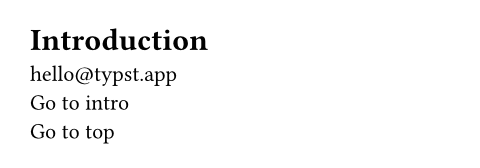
= Introduction <intro>
#link("mailto:hello@typst.app") \
#link(<intro>)[Go to intro] \
#link((page: 1, x: 0pt, y: 0pt))[
  Go to top
]
bodyRequiredRequiredRequired parameters must be specified when calling the function.PositionalPositionalPositional parameters can be set by specifying them in order, omitting the parameter name.
bodyThe content that should become a link.
If dest is an URL string, the parameter can be omitted. In this case,
the URL will be shown as the link.